

Subnesio features

Every feature built around one job: knowing what you actually pay every month.

Subnesio is a private, no-bank-connection subscription tracker. Each feature exists to answer a real question — what renews next, what got more expensive, where your money goes, and which subscription is quietly wasting it.

Why people use Subnesio

Everything you need to control recurring spending.

No bloated finance software. No confusing budgeting systems. Just the tools that help you understand, track, and stay ahead of every recurring payment.

Track every subscription

Track streaming services, AI tools, software, mobile plans, cloud hosting, memberships, and more. Support for multiple currencies, payment methods, promo pricing, and custom billing cycles.

SPSpotify Premium$9.99
FFigma$15.00
CLClaude Code$100.00

Know before charges happen

Get a reminder — by email, calendar, or Telegram — before every upcoming renewal, so you always know what's about to charge. Pause subscriptions, cancel forgotten trials, or avoid surprise payments entirely.

IN 3 DAYS · NOTIONNotion charges FridayUSD 8.00

Actually understand your spending

See monthly totals, category breakdowns, annual forecasts, price increases, and spending trends over time — all focused specifically on subscriptions.

$150.66+$4.80 vs April
See it in action

See your subscriptions, renewals, and monthly spend in one dashboard.

Every screen answers one question fast — what renews next, how much each subscription costs, and where your recurring money goes — without spreadsheets, without noise.

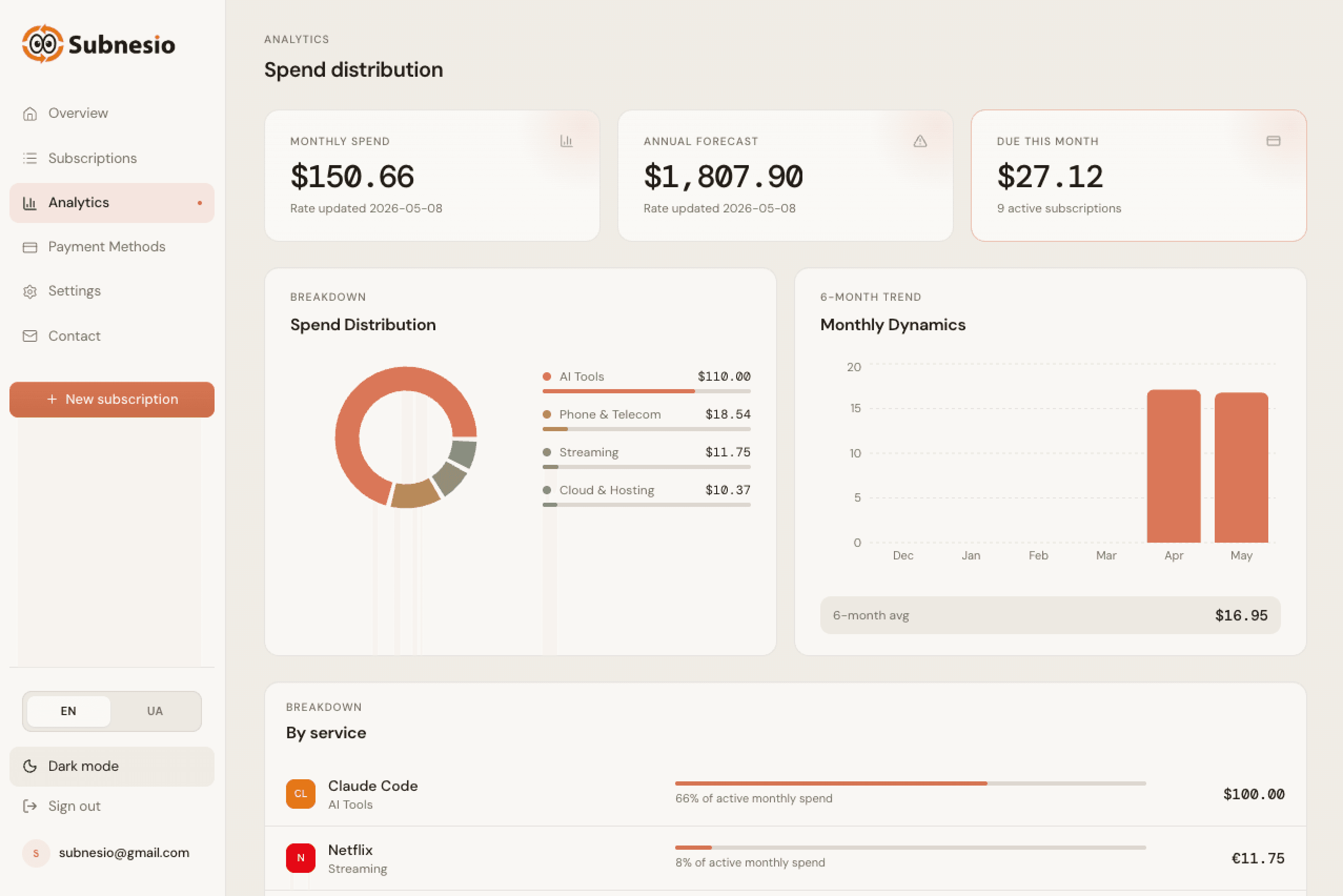
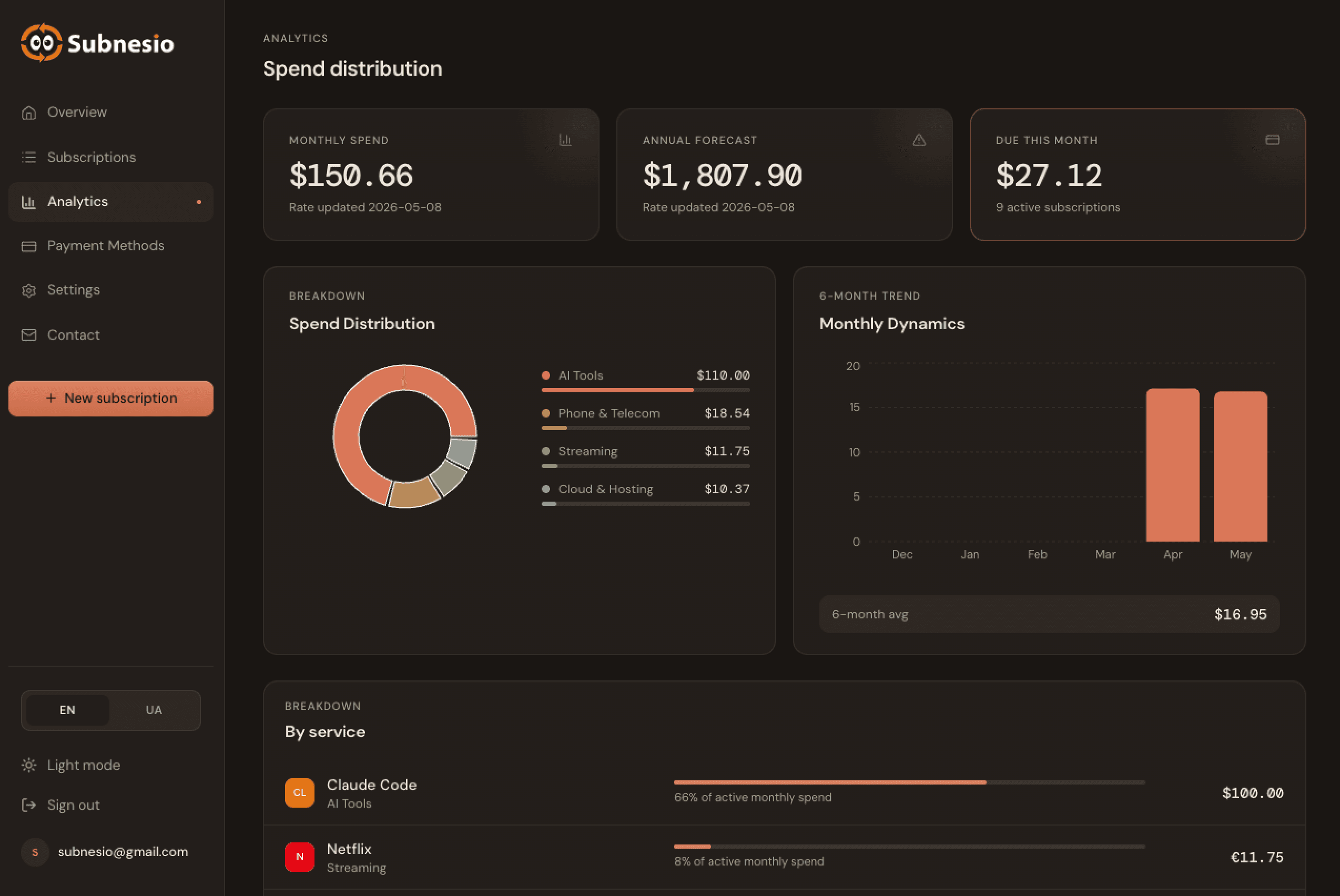
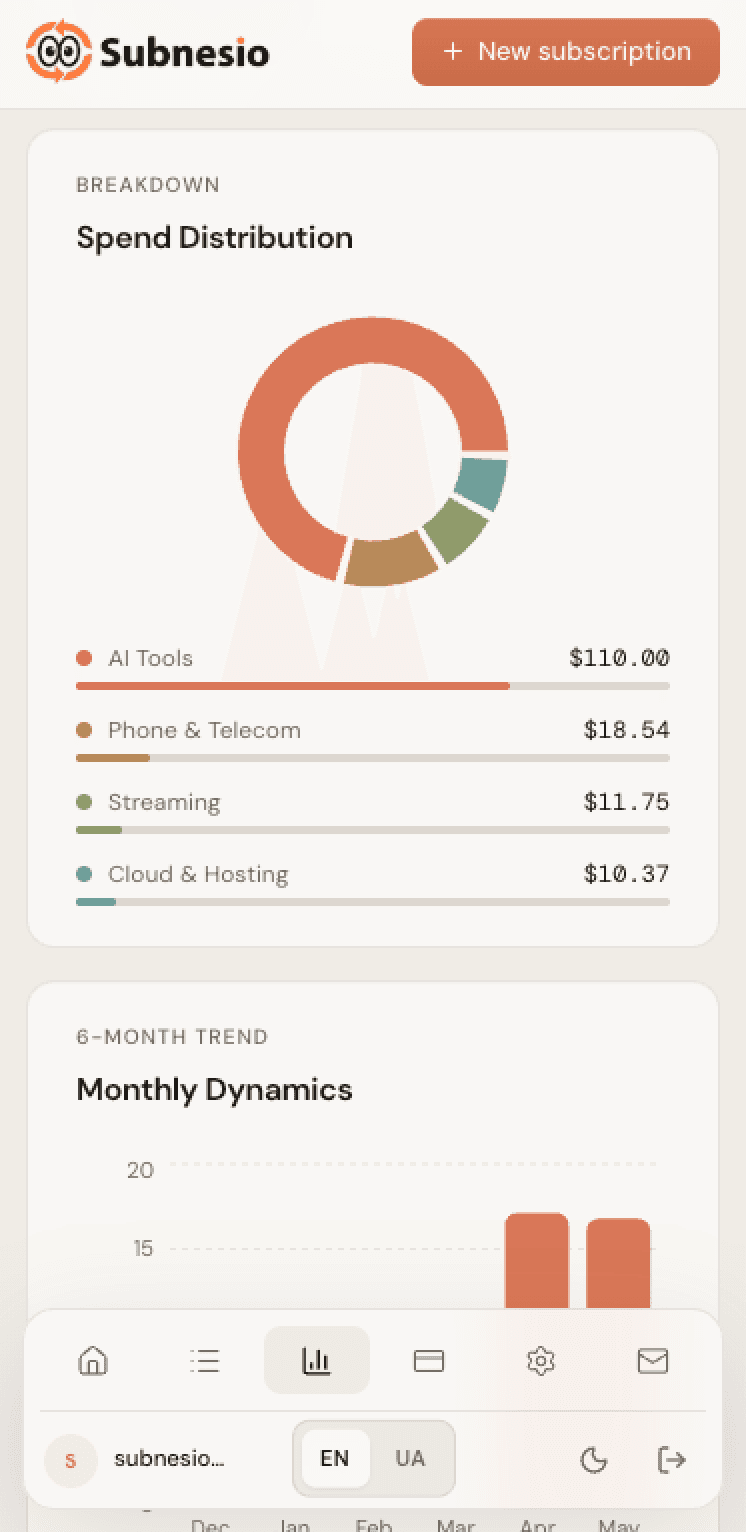
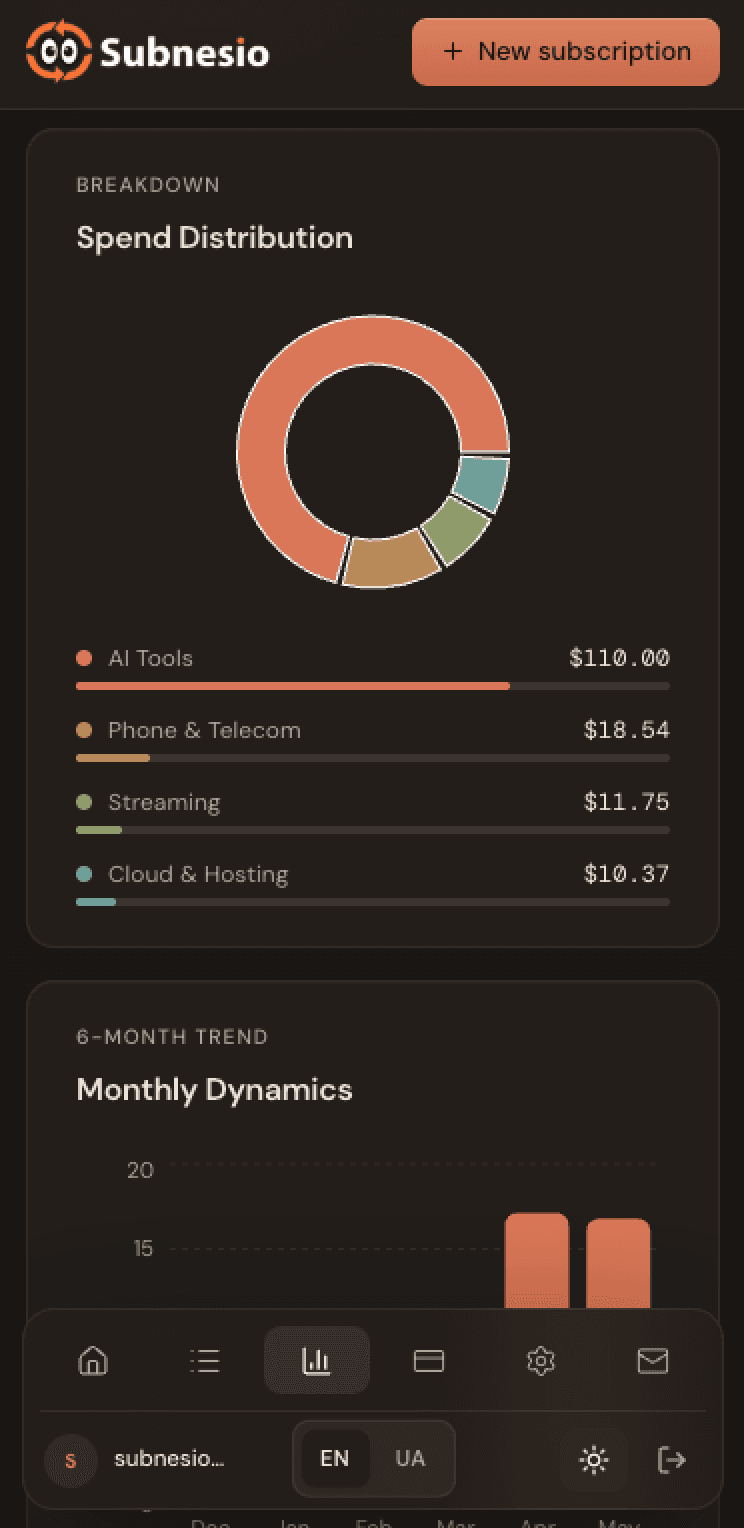
Analytics that earn their place
Tour · 01

Analytics that earn their place

See where your money goes — by category, by month, with totals and forecasts at a glance.
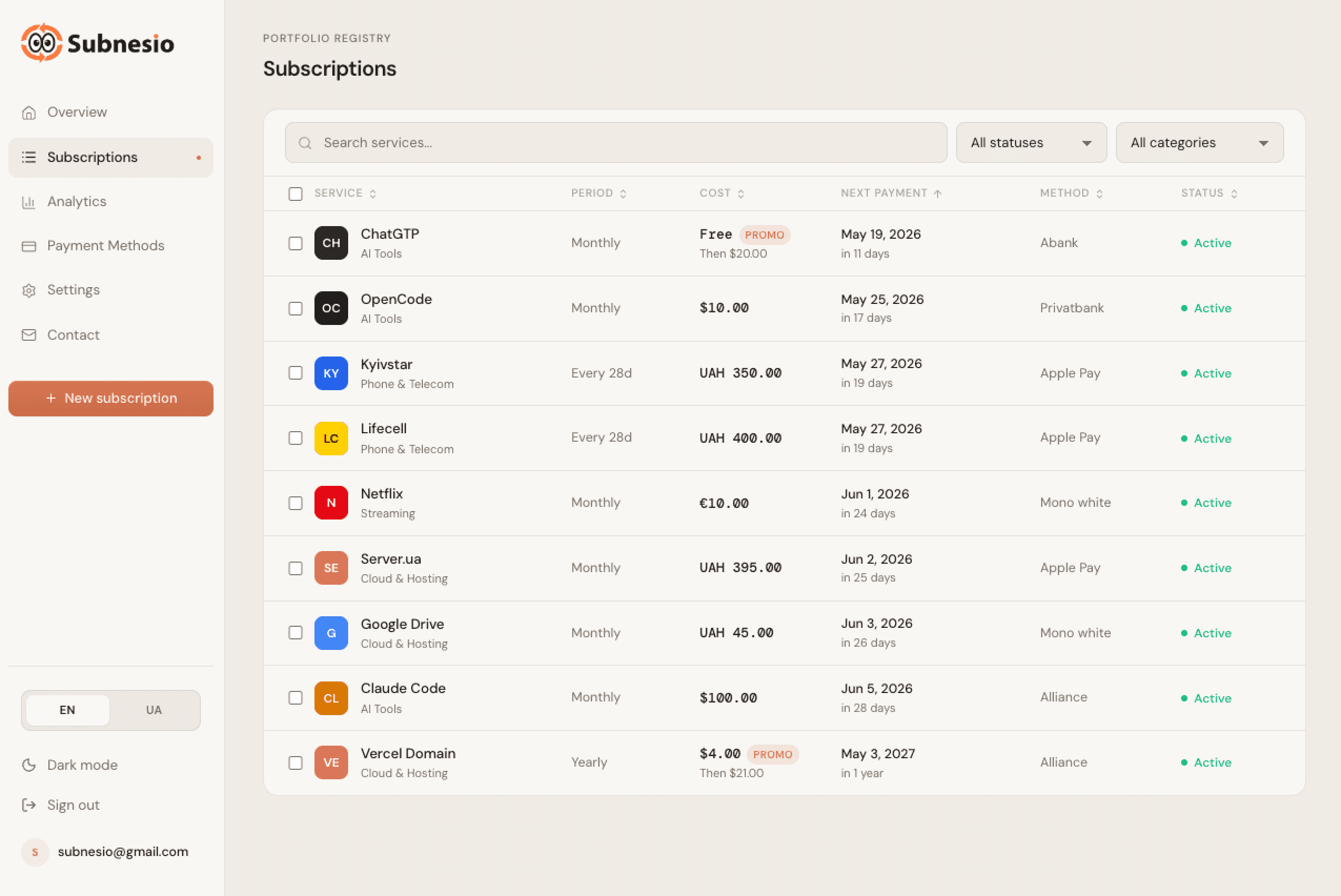
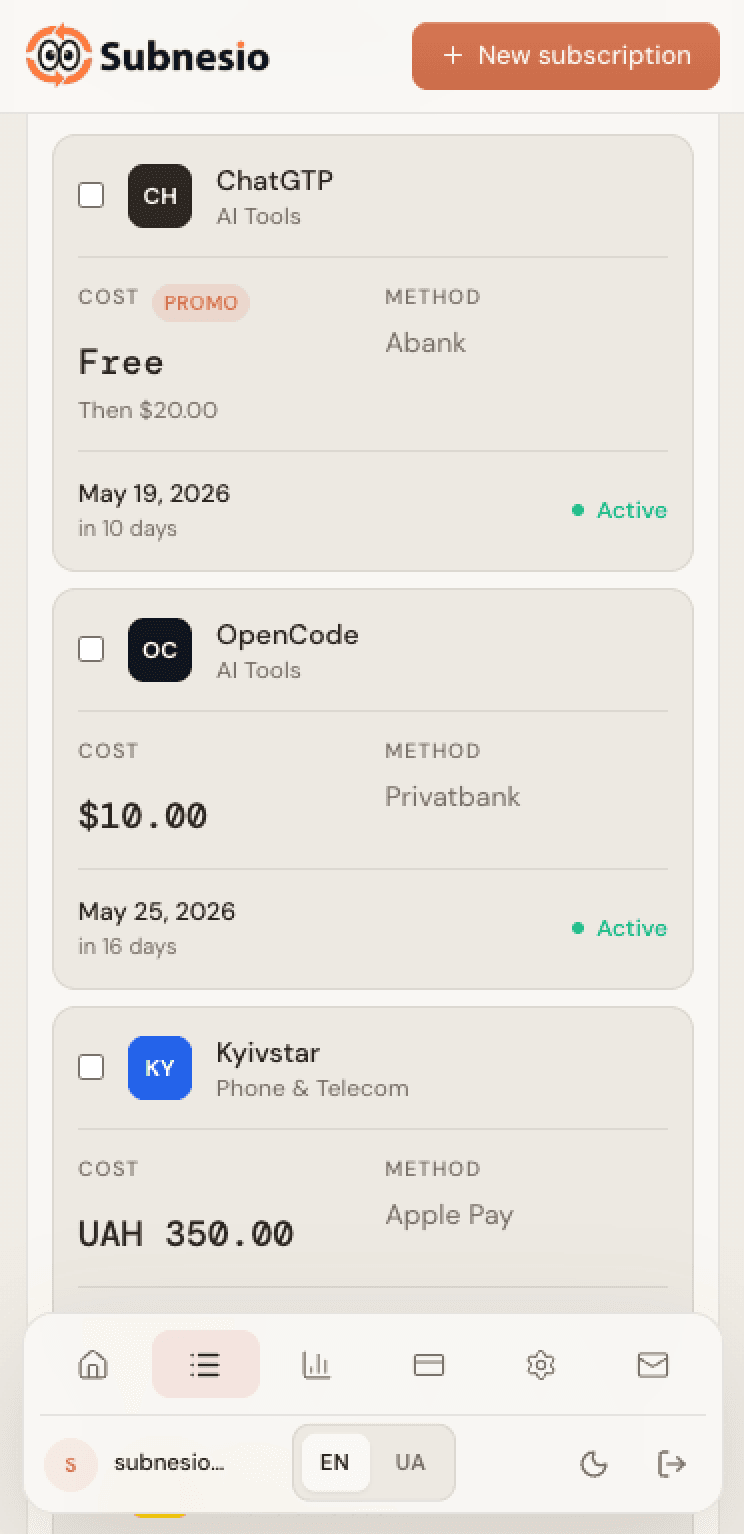
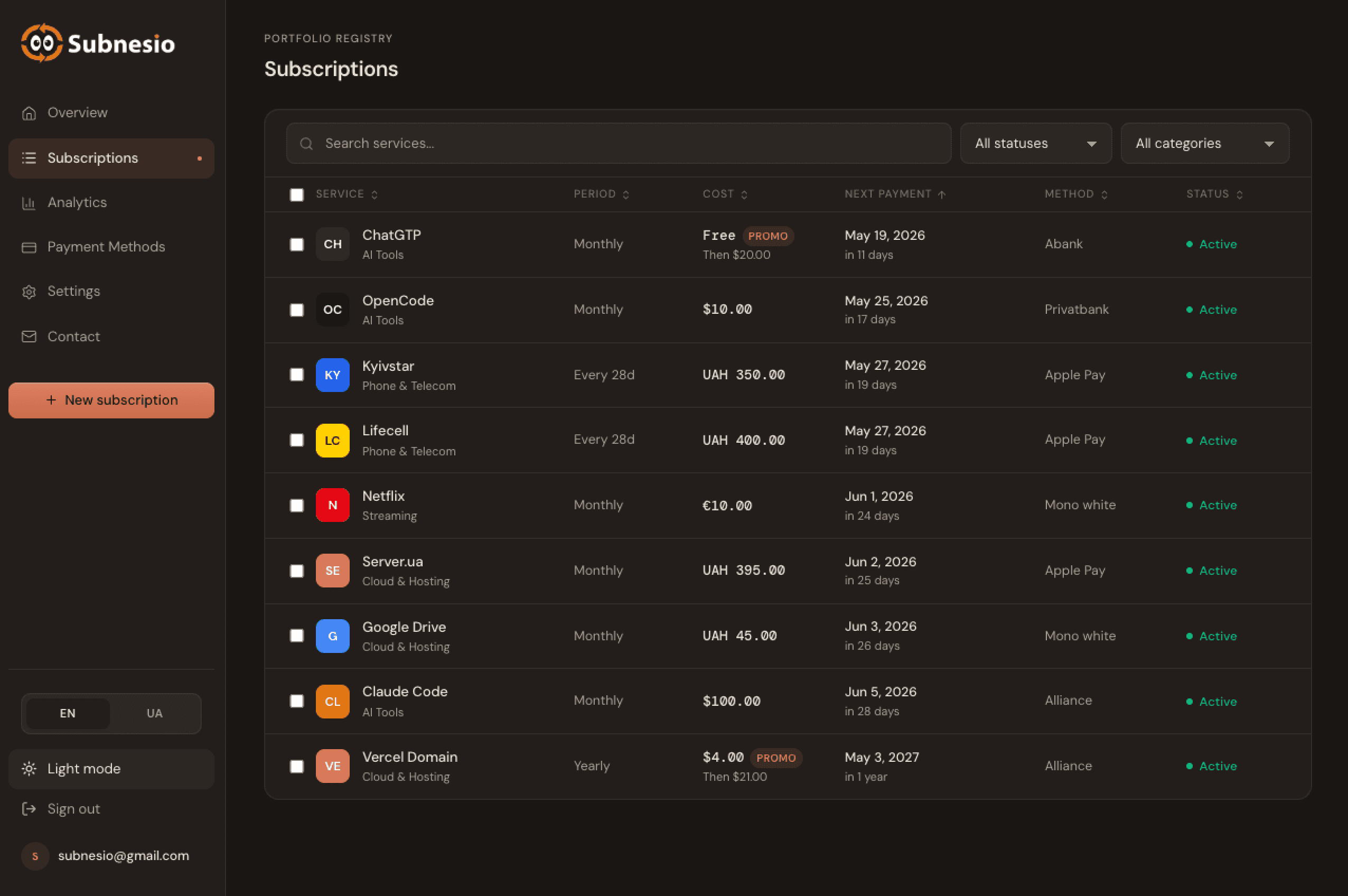
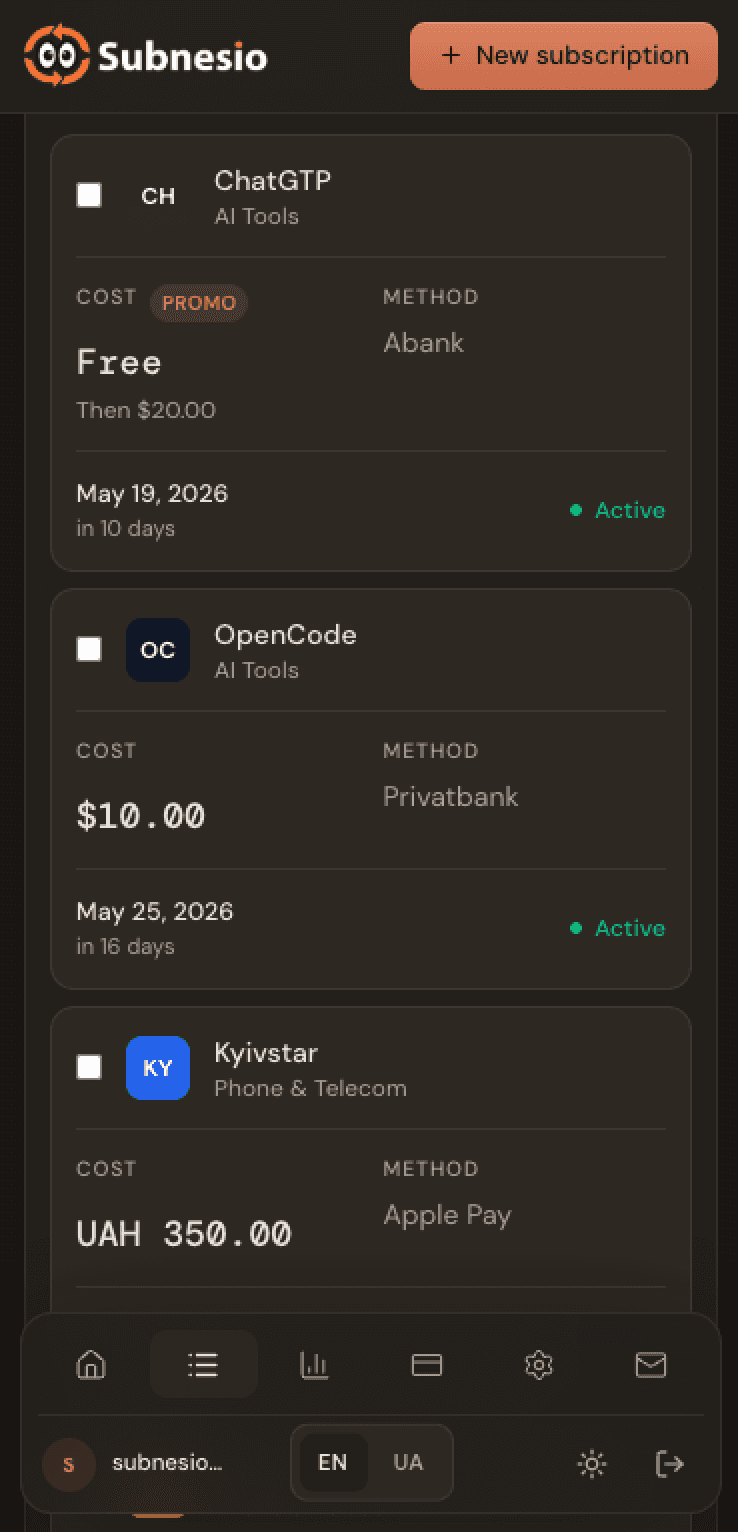
Every subscription, in one tidy list
Tour · 02

Every subscription, in one tidy list

Filter, search, and edit recurring charges in seconds. No spreadsheets, no rebuilding from memory.
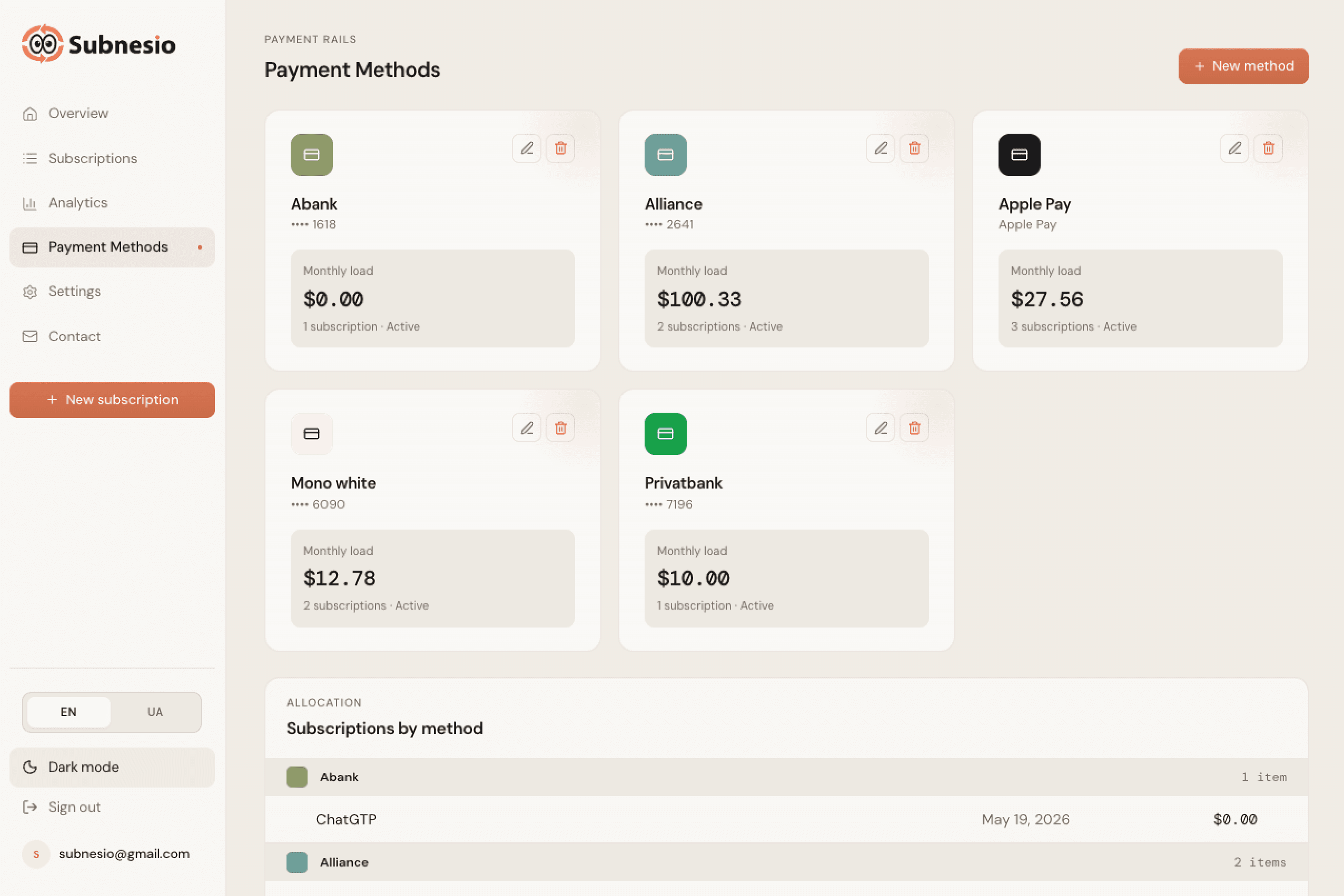
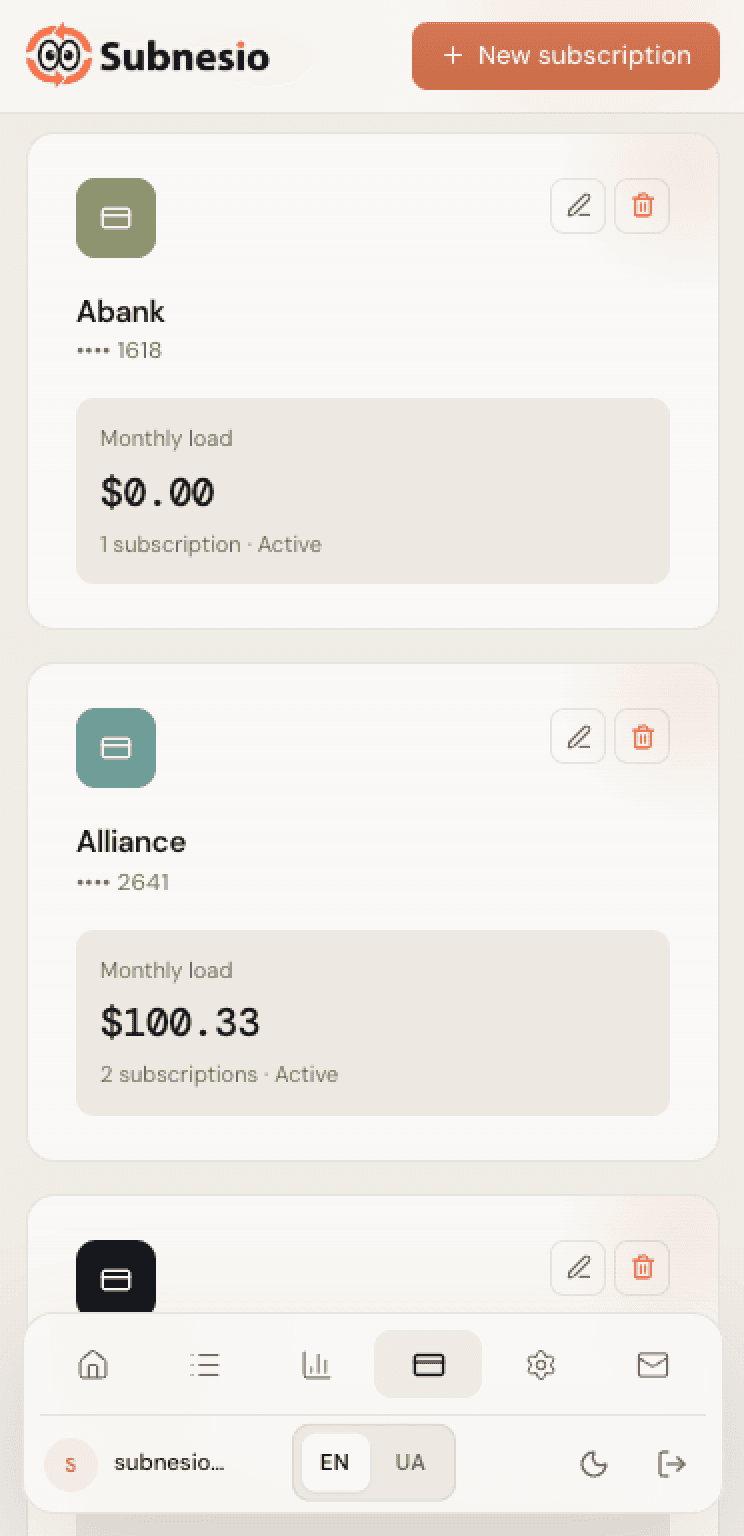
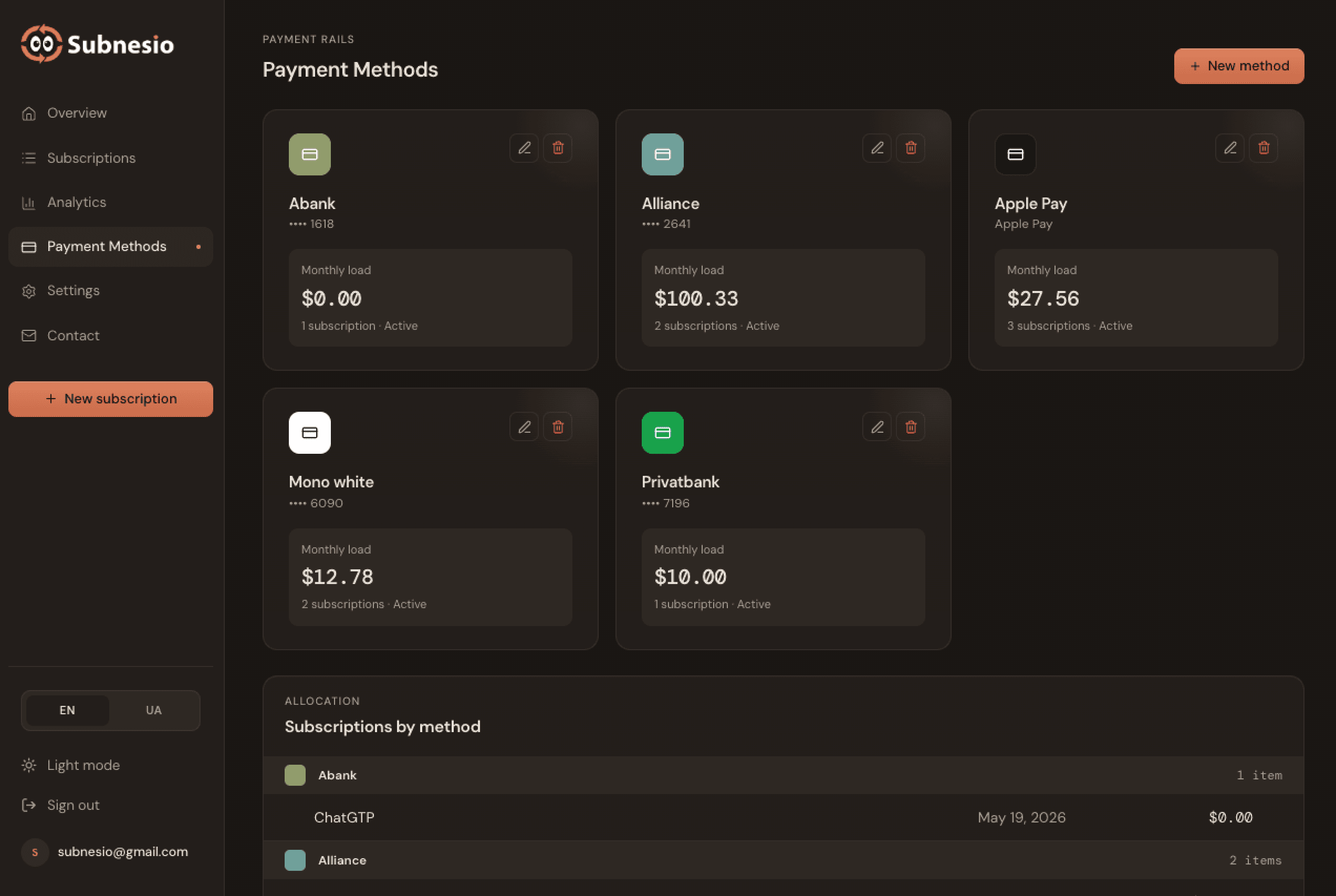
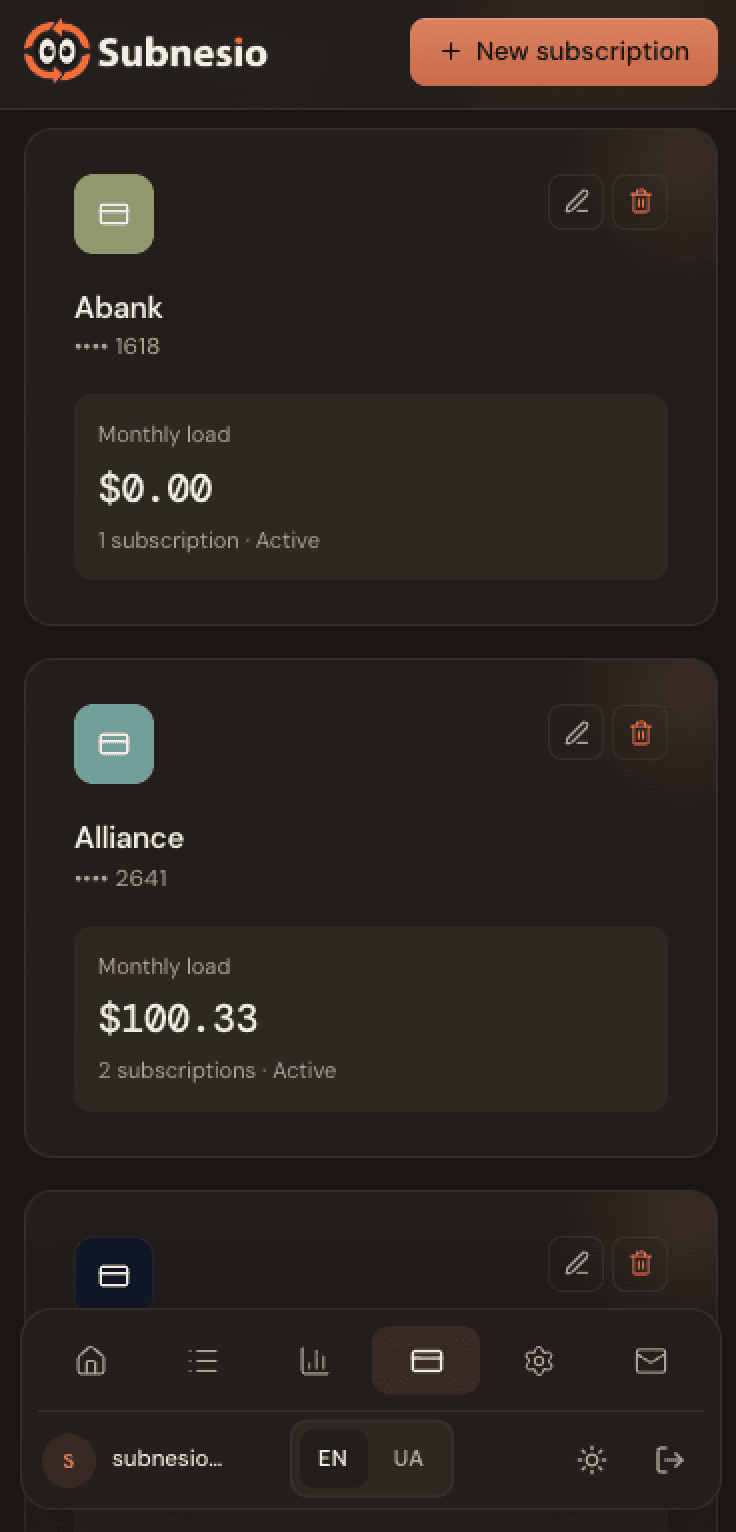
Know what each card actually costs you
Tour · 03

Know what each card actually costs you

Group subscriptions by card or wallet to spot which payment method is quietly running up the bill.

More to expect

The full list — feature by feature.

Everything below is available across plans (some Pro-only, called out per item). No bank credentials, no card to start, your data is yours.

Google & Apple Calendar sync

Personal iCal feed you subscribe to once. Every upcoming renewal lands in your calendar — Google, Apple, or any standard client. Pro / Lifetime.

Multi-currency dashboard

Add subscriptions in USD, EUR, GBP, UAH, PLN and more. Automatic conversion to your home currency for totals, monthly spend, and forecasts. Pro / Lifetime; Free totals are in USD.

Group by payment method

See exactly which card or wallet is racking up the bill. Surface forgotten cards that quietly pull recurring charges every month.

Price history tracking

When a subscription gets more expensive, Subnesio records it. Look back across months to see which services are creeping up and decide before you renew.

Promo & free-trial detection

Add a promo end date or trial conversion price, and Subnesio reminds you before the discount ends — so $0 trials don't quietly turn into $20/month.

Spot cheaper annual plans

For popular services, Subnesio flags when switching to annual billing would save you money — and shows exactly how much per year.

Smart tips on the dashboard

Up to three contextual insights every time you open the app: promo expiring, price hikes, renewal clusters, category overlap. Free for everyone.

Annual spending forecast

Roll every billing cycle — monthly, quarterly, yearly — into a single annual number. Cut one $9.99 you forgot about and watch the forecast drop in real time.

One-tap cancel help

Done with a subscription? For known services Subnesio links straight to the cancellation page — no hunting through account settings to stop the charge.

Private by design

No bank credentials, no card to start. You add subscriptions manually. Delete your account and every row is wiped — no soft-delete, no marketing list.

Setup takes less than a minute

Start managing subscriptions in 3 simple steps.

No complicated setup. No banking integrations. Just add your subscriptions once — and Subnesio keeps tracking them for you.

STEP 01

Add the services you pay for

Add the subscription name, price, billing cycle, currency, and payment method in seconds.

SERVICESpotify Premium
PRICE$9.99/ MONTH
CARDMono · 4242
STEP 02

Choose when to get reminded

Receive reminders 1 day, 3 days, a week, or even a month before renewals happen.

1d3d1w2w1m

→ We'll email you 3d before each charge.

STEP 03

Stay ahead of every renewal

Subnesio keeps track of upcoming charges, pricing changes, and recurring spending — automatically.

NNotion charges FridayIN 3 DAYS$8.00
CLClaude CodeIN 11 DAYS$100.00
SPSpotify PremiumMAY 27 · IN 19 DAYS$9.99
Smart tips · built in

Subnesio doesn't just track — it tells you what matters this week.

Your dashboard surfaces up to three contextual insights every time you open it. Free for everyone, no Pro needed.

Alert

ChatGPT — promo ends in 7 days

Price reverts from $0 → $20 / month. Decide before it auto-charges.

Heads up

5 charges hit May 25–27

Total: $400. Consider rebalancing billing dates to smooth cash flow.

Insight

Claude Code = 66% of your monthly spend

Any change to this single subscription has the biggest impact on your total.

Promo expiring · price hikes · spending spikes · renewal clusters · category overlap · and more — all detected automatically.

Why not just…

Why not just use a spreadsheet or your bank app?

Both work — until they don't. A spreadsheet doesn't send you reminders. A bank app misses what your partner's card paid for. Here's the side-by-side.

FeatureSpreadsheetBank appSubnesio
Reminders before each chargeNoPartialYes
Works without bank credentialsYesNoYes
Sees subscriptions across cards / wallets / partnersManualNoYes
Multi-currency conversionManualNoYes
Calendar export (iCal)NoNoYes
Annual spending forecastManualNoYes
Tracks price increases over timeNoNoYes

Spreadsheets win on flexibility. Bank apps win on autofill. Subnesio wins on the only thing that actually matters: knowing what's about to hit before it hits.

Tadel UnsoTadel Unso
Who's behind this

Built by one developer who needed it too.

Subnesio is a solo project — no startup, no investors, no growth team. I'm building it because I kept getting surprise renewals and lost track of my own subscriptions. Every feedback message is read by me personally, and every Pro purchase goes directly into shipping the next feature.

Frequently asked questions

Answers to the questions people ask before signing up.

If you don't see your question here, email us — we read every message.

How do I add a subscription?
Open the dashboard, click Add subscription, then enter the service name, price, currency, billing cycle, and payment method. It takes a few seconds and no banking integration is required.
Will I get reminders before charges?
Email reminders are part of Pro and Lifetime. Set the reminder window anywhere from one day to one month before each renewal, and Subnesio will email you in time. On the Free plan you still see upcoming renewals on the dashboard — just without the email.
Is my data private?
Yes. We only store the data you enter, we never sell it, and we do not run advertising trackers. See the Privacy Policy for full details.
Can I export to my calendar?
Calendar export is part of Pro and Lifetime. Subnesio generates a personal iCal feed you can subscribe to from Google Calendar, Apple Calendar, or any standard calendar app. Free tracks renewals on the dashboard without the calendar feed.
What happens if I cancel my Pro subscription?
Nothing is deleted — you drop to the Free plan with all your data intact. Email reminders, iCal sync and currency conversion turn off (home currency resets to USD). If you have more than 10 subscriptions, all of them stay visible but editing is locked until you delete down to 10 or upgrade again — you can always still delete. Deleting your account removes everything.
Does Subnesio connect to my bank account?
No. Subnesio never asks for bank credentials and never connects to financial accounts. You add what you pay manually, which keeps the app secure and predictable — there is no third-party aggregator in the loop.
Can I track subscriptions in multiple currencies?
Yes — you can add subscriptions in USD, EUR, GBP, UAH, PLN, and more on any plan. Automatic conversion to your home currency for totals, monthly spend, and forecasts is part of Pro and Lifetime; on Free, totals are computed in USD.
Can I track shared family subscriptions?
Yes. Add each shared subscription once and label the payment method. If you split the bill with family or friends, store the share in the notes — Subnesio still tracks the full charge so you never miss a renewal.
How is Subnesio different from a bank's subscription tracker?
Banks only see charges from accounts you hold with them and miss anything paid through gift cards, prepaid services, partners' cards, or apps that bundle the charge into a single invoice. Subnesio works across every payment method, supports multiple currencies, sends reminders before charges, and exports to your calendar.
How do I add Subnesio reminders to Google Calendar or Apple Calendar?
Calendar sync is part of Pro and Lifetime. Open Settings → Calendar feed, copy the personal iCal URL, and subscribe to it from Google Calendar (Other calendars → From URL) or Apple Calendar (File → New Calendar Subscription). Every upcoming renewal then appears as a calendar event automatically.
Is the free plan really free, and will it stay free?
Yes. The Free plan tracks up to 10 subscriptions, shows upcoming renewals in the dashboard, and gives you spending analytics — no credit card required. It's a permanent tier, not a trial. Email reminders, multi-currency conversion, and calendar sync are part of Pro.
How do I cancel a subscription I forgot about?
Open Subnesio, find the subscription you want to cancel, then visit the provider's website or app and cancel it there — Subnesio doesn't cancel on your behalf, but it makes sure you know exactly what's about to renew and when, so nothing slips past unnoticed.
Does Subnesio work on iPhone and Android?
Yes. Subnesio is a web app, so it runs in any modern browser on iPhone, Android, iPad, Mac, and Windows. Add it to your home screen for a native-app feel.
Can I track yearly subscriptions, not just monthly ones?
Yes. Subnesio supports weekly, monthly, quarterly, yearly, and custom billing cycles on every plan. Yearly charges show up on the dashboard and count toward your totals. With Pro you also get email reminders ahead of each renewal and an annual forecast.
Ready when you are

Start tracking in under a minute.

Add your first subscription, see your renewals, and take back control of recurring spending — without giving anyone bank access.

Start Free

We use analytics (PostHog, EU servers) to improve Subnesio. No ads, no selling data. Privacy Policy